How Can We Help?
Last Update: 24-Mar-2021
This article highlights some of the key area of attention when using the Exagon Brain with the iMRS Prime system
1. Minimum Firmware Requirement:
Your iMRS Prime firmware version MUST upgrade to 2.08 or higher (recommended 2.12) in order to use the BRAIN. Please check out the latest firmware download here: https://imrsprime.com/support
2. Port Assignment
If you have only a single BRAIN plugged into the connector box, then choosing left or right out (green hexagon 4) doesn’t really matter much. However, if you are plugging into two Exagon Brain to the same connector, or using Split Mode, do take note of the Left/Right port assignment and choose accordingly. In 2.12 firmware, you will be presented with a left/right label so it’s easier to identify.
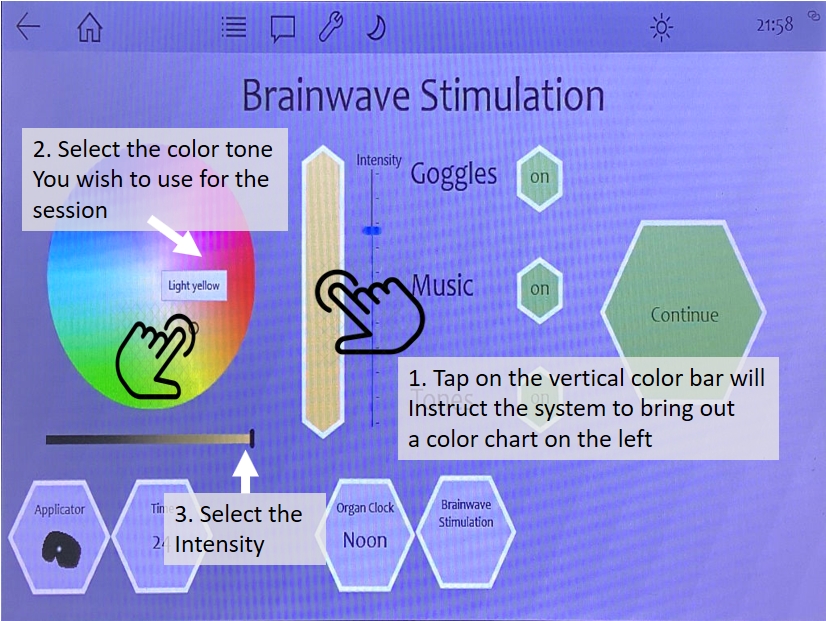
3. Adjusting Color/Intensity
You can increase / decrease the intensity of the RED/GREEN/BLUE RGB and Intensity using the +/- button.
Method 1: Touch and hold the respective +/- button to tell the system auto increase/decrease the intensity. Lift your finger when you want to stop the counter.
Method 2: Touch and slide the respective +/- button to tell the system to auto increase/decrease the intensity (hands-off). Just press the same button again to stop the counter.
Sliding direction: Slide left/right (see video below)
Method 3: Tap and hold the color bar. This will bring out the color tone selector chart.